# Physical Environment components
This section outlines the steps to be performed to configure the physical environment used in this solution
# Switching and cabling
Figure 5 describes the cabling configuration of nineteen (19) HPE ProLiant DL Gen10 Servers as well as the HPE Aruba 8325-32C BF switches and Aruba VSX, which takes advantage of the ArubaOS-CX modern architecture, and delivers best in class high availability within the context of this solution
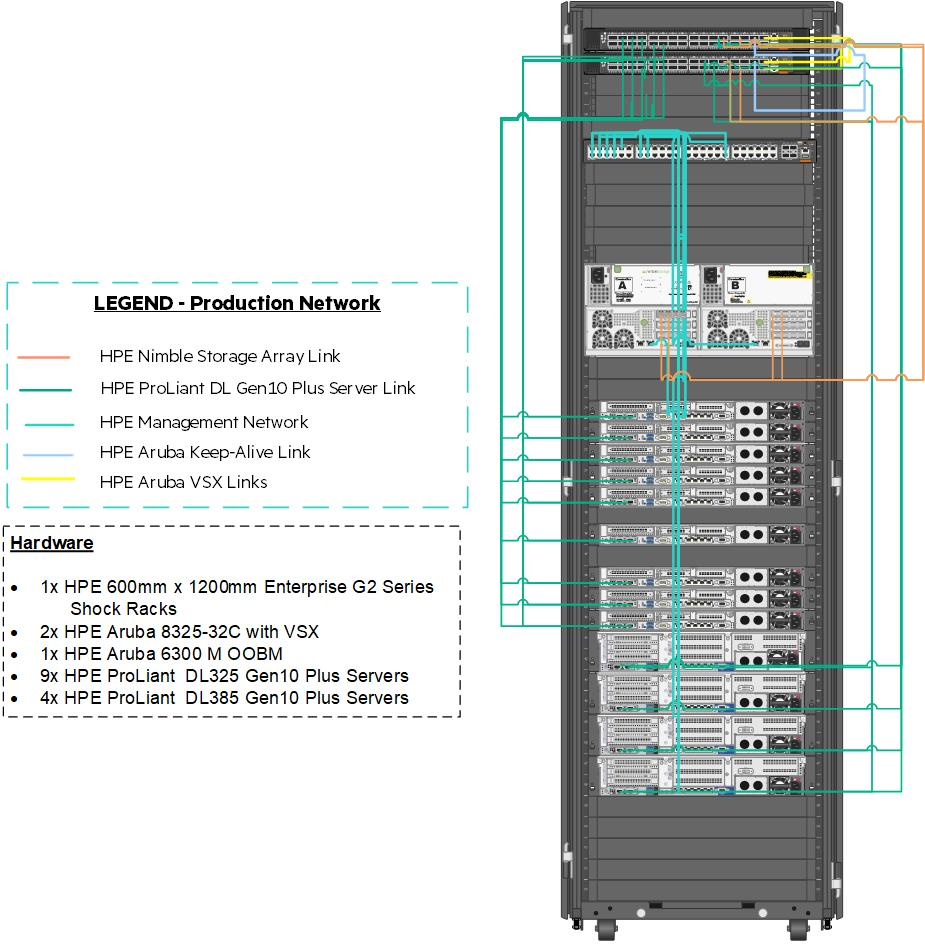
Figure 5. Frame and switch cabling within the solution
Table 5 explains the cabling of the Virtual Connect interconnect modules to the HPE Aruba 8325-32C switching.
[]{#table5 .anchor}Table 5. Network used in this solution.
| Network Name | Type | VLAN Number | Purpose | Requested Bandwidth (Gb) | Maximum Bandwidth (Gb) |
|---|---|---|---|---|---|
| DataCenter_Network | Ethernet | 2193 | Production Application, authentication and other user networks | 2.5 | 100 |
| Management_Network | Ethernet | 1193 | iLO, ESXi management and other management networks | 2.5 | 100 |
| iSCSI_Network (optional) | Ethernet | 3193 | HPE Nimble Storage Arrays Connectivity | 2.5 | 100 |
# Physical cabling
Table 6 represents mapping of source ports to ports on the HPE Aruba 8325-32C switches.
Table 6. HPE Aruba port map
| Uplink Set | DL Source | Switch Destination |
|---|---|---|
| Datacenter_Network | Enclosure 1 Port Q3 | Interface1/1/1 |
| Enclosure 1 Port Q4 | Interface1/1/2 | |
| Enclosure 2 Port Q3 | Interface1/1/3 | |
| Enclosure 2 Port Q4 | Interface1/1/4 | |
Hewlett Packard Enterprise recommends that the installation user logs on to the switch, post-configuration and provide a description for each of these ports.
# Network definition
There are multiple networks defined at the switch layer in this solution:
Management Network -- This network facilitates the management of hardware and software interfaced by IT.
Data Center Network -- This network carries traffic from the overlay network used by the pods to external consumers of pod deployed services.
# Configure VLAN
This section details the steps required to configure a VLAN.
- To add these networks to the switch, logon to the switch console over SSH and run the following commands.
>
> # sys
>
> # vlan 1193 2193
>
- For each of these VLANs, perform the following steps.
>
> # interface vlan-interface ####
>
> # name VLAN Name per table above
>
> # description Add text that describes the purpose of the VLAN
>
> # quit
>
NOTE
Hewlett Packard Enterprise strongly recommends configuring a dummy VLAN on the switches and assign unused ports to that VLAN.
- The switches should be configured with a bridge aggregation group (BAGG) for the different links to the HPE DL Server connections. To configure the BAGG and ports as described in Table 5, run the following commands.
>
> # interface Bridge-Aggregation111
>
> # link-aggregation mode dynamic
>
> # description \<FrameNameU30\>-ICM
>
> # quit
>
> # interface range name \<FrameNameU30\>-ICM interface
> Bridge-Aggregation111
>
> # quit
>
> # interface range HundredGigE 1/1/1 to HundredGigE 1/1/2 HundredGigE
> 2/1/1 to HundredGigE 2/1/2
>
> # port link-aggregation group 111
>
> # quit
>
> # interface range name \<FrameNameU30\>-ICM
>
> # port link-type trunk
>
> # undo port trunk permit vlan 1
>
> # port trunk permit vlan 1193 2193
>
> # quit
>
- After the configuration of the switches is complete, save the state and apply it by typing save and follow the resulting prompts.