# Manually Install and configure Google Anthos 1.8
# Creating Admin Cluster
- In the following example, all service accounts are automatically created by the bmctl create config command
bmctl create config -c ***ADMIN_CLUSTER_NAME*** --enable-apis --create-service-accounts --project-id=***CLOUD_PROJECT_ID***
NOTE
ADMIN_CLUSTER_NAME: the name of the new cluster.
CLOUD_PROJECT_ID: your Google Cloud project ID.
- Run the below command to a config file for admin cluster named admin1 associated with project ID my-gcp-project.
bmctl create config -c admin1
NOTE
The file is written to bmctl-workspace/admin1/admin1.yaml.
- Run the below command to create admin cluster.
bmctl create cluster --c admin1
- Sample manifests file for creating admin cluster on bare metal
> gcrKeyPath:
> bmctl-workspace/.sa-keys/anthos-on-proliant-dl-d46105613458.json

> #sshPrivateKeyPath: \<path to SSH private key, used for node access\>

> sshPrivateKeyPath: /home/user/.ssh/id_rsa

> gkeConnectAgentServiceAccountKeyPath:
> bmctl-workspace/.sa-keys/anthos-on-proliant-dl-026fe05e49f6.json

> gkeConnectRegisterServiceAccountKeyPath:
> bmctl-workspace/.sa-keys/anthos-on-proliant-dl-3942a98cc261.json

> cloudOperationsServiceAccountKeyPath:
> bmctl-workspace/.sa-keys/anthos-on-proliant-dl-ee7fc370c8a3.json
> ---
>
> apiVersion: v1
>
> kind: Namespace
>
> metadata:
>
> name: cluster-admin1
>
> ---
>
> apiVersion: baremetal.cluster.gke.io/v1
>
> kind: Cluster
>
> metadata:
>
> name: admin1
>
> namespace: cluster-admin1
>
> spec:
>
> # Cluster type. This can be:
>
> # 1) admin: to create an admin cluster. This can later be used to
> create user clusters.
>
> # 2) user: to create a user cluster. Requires an existing admin
> cluster.
>
> # 3) hybrid: to create a hybrid cluster that runs admin cluster
> components and user workloads.
>
> # 4) standalone: to create a cluster that manages itself, runs user
> workloads, but does not manage other clusters.
>
> type: admin
>
> # Anthos cluster version.
>
> anthosBareMetalVersion: 1.8.0
>
> # GKE connect configuration
>
> gkeConnect:
>
> projectID: anthos-on-proliant-dl
>
> # Control plane configuration
>
> controlPlane:
>
> nodePoolSpec:
>
> nodes:
>
> # Control plane node pools. Typically, this is either a single
> machine
>
> # or 3 machines if using a high availability deployment.
>
> - address: 20.0.61.101
>
> - address: 20.0.61.102
>
> - address: 20.0.61.104
>
> # Cluster networking configuration
>
> clusterNetwork:
>
> # Pods specify the IP ranges from which pod networks are allocated.
>
> pods:
>
> cidrBlocks:
>
> - 192.168.0.0/16
>
> # Services specify the network ranges from which service virtual IPs
> are allocated.
>
> # This can be any RFC1918 range that does not conflict with any other
> IP range
>
> # in the cluster and node pool resources.
>
> services:
>
> cidrBlocks:
>
> - 10.96.0.0/20
>
> # Load balancer configuration
>
> loadBalancer:
>
> # Load balancer mode can be either \'bundled\' or \'manual\'.
>
> # In \'bundled\' mode a load balancer will be installed on load
> balancer nodes during cluster creation.
>
> # In \'manual\' mode the cluster relies on a manually-configured
> external load balancer.
>
> mode: bundled
>
> # Load balancer port configuration
>
> ports:
>
> # Specifies the port the load balancer serves the Kubernetes control
> plane on.
>
> # In \'manual\' mode the external load balancer must be listening on
> this port.
>
> controlPlaneLBPort: 443
>
> # There are two load balancer virtual IP (VIP) addresses: one for the
> control plane
>
> # and one for the L7 Ingress service. The VIPs must be in the same
> subnet as the load balancer nodes.
>
> # These IP addresses do not correspond to physical network
> interfaces.
>
> vips:
>
> # ControlPlaneVIP specifies the VIP to connect to the Kubernetes API
> server.
>
> # This address must not be in the address pools below.
>
> controlPlaneVIP: 20.0.61.220
>
> # IngressVIP specifies the VIP shared by all services for ingress
> traffic.
>
> # Allowed only in non-admin clusters.
>
> # This address must be in the address pools below.
>
> # ingressVIP: 10.0.0.2
>
> # AddressPools is a list of non-overlapping IP ranges for the data
> plane load balancer.
>
> # All addresses must be in the same subnet as the load balancer
> nodes.
>
> # Address pool configuration is only valid for \'bundled\' LB mode in
> non-admin clusters.
>
> # addressPools:
>
> # - name: pool1
>
> # addresses:
>
> # # Each address must be either in the CIDR form (1.2.3.0/24)
>
> # # or range form (1.2.3.1-1.2.3.5).
>
> # - 10.0.0.1-10.0.0.4
>
> # A load balancer node pool can be configured to specify nodes used
> for load balancing.
>
> # These nodes are part of the Kubernetes cluster and run regular
> workloads as well as load balancers.
>
> # If the node pool config is absent then the control plane nodes are
> used.
>
> # Node pool configuration is only valid for \'bundled\' LB mode.
>
> # nodePoolSpec:
>
> # nodes:
>
> # - address: \<Machine 1 IP\>
>
> # Proxy configuration
>
> # proxy:
>
> # url: http://\[username:password@\]domain
>
> # # A list of IPs, hostnames or domains that should not be proxied.
>
> # noProxy:
>
> # - 127.0.0.1
>
> # - localhost
>
> # Logging and Monitoring
>
> clusterOperations:
>
> # Cloud project for logs and metrics.
>
> projectID: anthos-on-proliant-dl
>
> # Cloud location for logs and metrics.
>
> location: us-central1
>
> # Enable Cloud Audit Logging if uncommented and set to false.
>
> # disableCloudAuditLogging: false
>
> # Whether collection of application logs/metrics should be enabled
> (in addition to
>
> # collection of system logs/metrics which correspond to system
> components such as
>
> # Kubernetes control plane or cluster management agents).
>
> # enableApplication: false
>
> # Storage configuration
>
> storage:
>
> # lvpNodeMounts specifies the config for local PersistentVolumes
> backed by mounted disks.
>
> # These disks need to be formatted and mounted by the user, which can
> be done before or after
>
> # cluster creation.
>
> lvpNodeMounts:
>
> # path specifies the host machine path where mounted disks will be
> discovered and a local PV
>
> # will be created for each mount.
>
> path: /mnt/localpv-disk
>
> # storageClassName specifies the StorageClass that PVs will be
> created with. The StorageClass
>
> # is created during cluster creation.
>
> storageClassName: local-disks
>
> # lvpShare specifies the config for local PersistentVolumes backed by
> subdirectories in a shared filesystem.
>
> # These subdirectories are automatically created during cluster
> creation.
>
> lvpShare:
>
> # path specifies the host machine path where subdirectories will be
> created on each host. A local PV
>
> # will be created for each subdirectory.
>
> path: /mnt/localpv-share
>
> # storageClassName specifies the StorageClass that PVs will be
> created with. The StorageClass
>
> # is created during cluster creation.
>
> storageClassName: local-shared
>
> # numPVUnderSharedPath specifies the number of subdirectories to
> create under path.
>
> numPVUnderSharedPath: 5
>
> # NodeConfig specifies the configuration that applies to all nodes in
> the cluster.
>
> nodeConfig:
>
> # podDensity specifies the pod density configuration.
>
> podDensity:
>
> # maxPodsPerNode specifies at most how many pods can be run on a
> single node.
>
> maxPodsPerNode: 250
>
> # containerRuntime specifies which container runtime to use for
> scheduling containers on nodes.
>
> # containerd and docker are supported.
>
> containerRuntime: docker
>
> # KubeVirt configuration, uncomment this section if you want to
> install kubevirt to the cluster
>
> # kubevirt:
>
> # # if useEmulation is enabled, hardware accelerator (i.e relies on
> cpu feature like vmx or svm)
>
> # # will not be attempted. QEMU will be used for software emulation.
>
> # # useEmulation must be specified for KubeVirt installation
>
> # useEmulation: false
>
> # Authentication; uncomment this section if you wish to enable
> authentication to the cluster with OpenID Connect.
>
> # authentication:
>
> # oidc:
>
> # # issuerURL specifies the URL of your OpenID provider, such as
> \"https://accounts.google.com\". The Kubernetes API
>
> # # server uses this URL to discover public keys for verifying
> tokens. Must use HTTPS.
>
> # issuerURL: \<URL for OIDC Provider; required\>
>
> # # clientID specifies the ID for the client application that makes
> authentication requests to the OpenID
>
> # # provider.
>
> # clientID: \<ID for OIDC client application; required\>
>
> # # clientSecret specifies the secret for the client application.
>
> # clientSecret: \<Secret for OIDC client application; optional\>
>
> # # kubectlRedirectURL specifies the redirect URL (required) for the
> gcloud CLI, such as
>
> # # \"http://localhost:\[PORT\]/callback\".
>
> # kubectlRedirectURL: \<Redirect URL for the gcloud CLI; optional,
> default is \"http://kubectl.redirect.invalid\"\>
>
> # # username specifies the JWT claim to use as the username. The
> default is \"sub\", which is expected to be a
>
> # # unique identifier of the end user.
>
> # username: \<JWT claim to use as the username; optional, default is
> \"sub\"\>
>
> # # usernamePrefix specifies the prefix prepended to username claims
> to prevent clashes with existing names.
>
> # usernamePrefix: \<Prefix prepended to username claims; optional\>
>
> # # group specifies the JWT claim that the provider will use to
> return your security groups.
>
> # group: \<JWT claim to use as the group name; optional\>
>
> # # groupPrefix specifies the prefix prepended to group claims to
> prevent clashes with existing names.
>
> # groupPrefix: \<Prefix prepended to group claims; optional\>
>
> # # scopes specifies additional scopes to send to the OpenID
> provider as a comma-delimited list.
>
> # scopes: \<Additional scopes to send to OIDC provider as a
> comma-separated list; optional\>
>
> # # extraParams specifies additional key-value parameters to send to
> the OpenID provider as a comma-delimited
>
> # # list.
>
> # extraParams: \<Additional key-value parameters to send to OIDC
> provider as a comma-separated list; optional\>
>
> # # proxy specifies the proxy server to use for the cluster to
> connect to your OIDC provider, if applicable.
>
> # # Example: https://user:password\@10.10.10.10:8888. If left blank,
> this defaults to no proxy.
>
> # proxy: \<Proxy server to use for the cluster to connect to your
> OIDC provider; optional, default is no proxy\>
>
> # # deployCloudConsoleProxy specifies whether to deploy a reverse
> proxy in the cluster to allow Google Cloud
>
> # # Console access to the on-premises OIDC provider for
> authenticating users. If your identity provider is not
>
> # # reachable over the public internet, and you wish to authenticate
> using Google Cloud Console, then this field
>
> # # must be set to true. If left blank, this field defaults to
> false.
>
> # deployCloudConsoleProxy: \<Whether to deploy a reverse proxy for
> Google Cloud Console authentication; optional\>
>
> # # certificateAuthorityData specifies a Base64 PEM-encoded
> certificate authority certificate of your identity
>
> # # provider. It\'s not needed if your identity provider\'s
> certificate was issued by a well-known public CA.
>
> # # However, if deployCloudConsoleProxy is true, then this value
> must be provided, even for a well-known public
>
> # # CA.
>
> # certificateAuthorityData: \<Base64 PEM-encoded certificate
> authority certificate of your OIDC provider; optional\>
>
> # Node access configuration; uncomment this section if you wish to
> use a non-root user
>
> # with passwordless sudo capability for machine login.
>
> nodeAccess:
>
> loginUser: username
>
> ---
>
> # Node pools for worker nodes
>
> apiVersion: baremetal.cluster.gke.io/v1
>
> kind: NodePool
>
> metadata:
>
> name: node-pool-1
>
> namespace: cluster-admin1
>
> spec:
>
> clusterName: admin1
>
> nodes:
>
> - address: 20.0.61.105
>
> - address: 20.0.61.106
# Logging in to a cluster from the Cloud Console
export k= bmctl-workspace/admin5/admin5-kubeconfig
kubectl create serviceaccount googleanthos --kubeconfig $k
kubectl create clusterrolebinding cluster-user --clusterrole view --serviceaccount default:googleanthos --kubeconfig $k
kubectl get serviceaccounts --kubeconfig $k
kubectl describe serviceaccounts googleanthos --kubeconfig $k
kubectl create clusterrolebinding cluster-user-googleanthos --clusterrole view --serviceaccount default:googleanthos --kubeconfig $k
kubectl create clusterrolebinding addon-cluster-admin5 --clusterrole cloud-console-reader --serviceaccount default:googleanthos --kubeconfig $k
TOKENNAME=`kubectl get serviceaccount/googleanthos -o jsonpath='{.secrets[0].name}' --kubeconfig $k
kubectl get secret $TOKENNAME -o jsonpath='{.data.token}' --$k | base64 --decode
here token will be generated copy and paste in the gcloud console
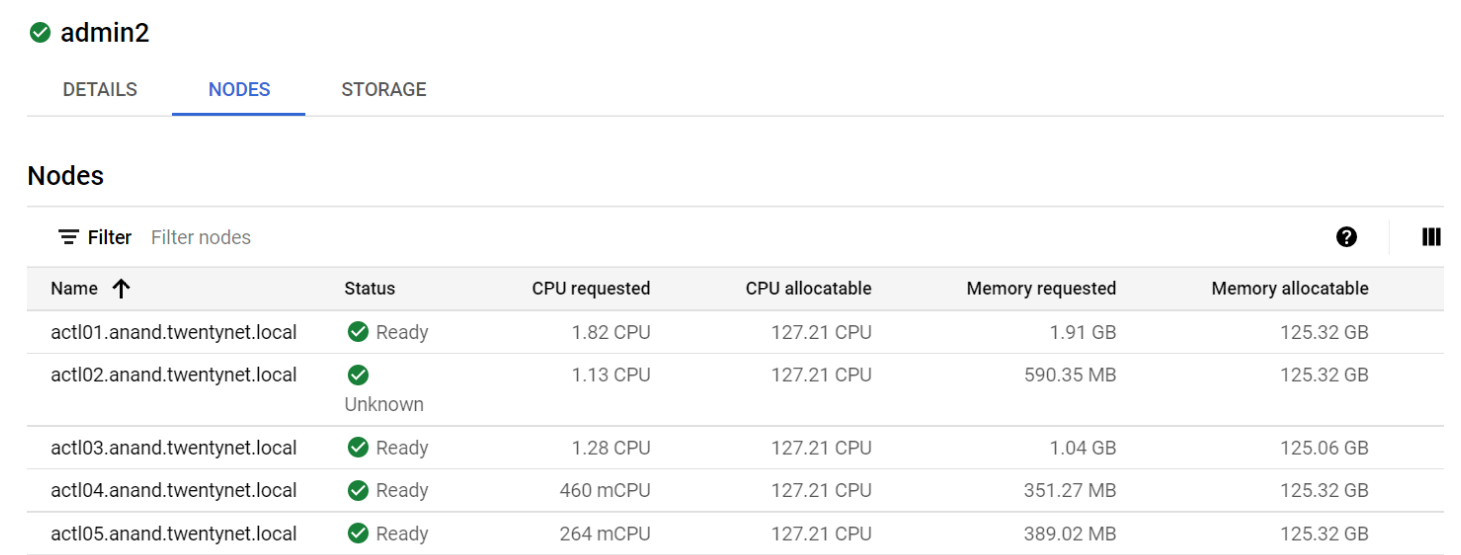
- On Google cloude console, Navigate to admin cluster and click on nodes, it will displays as follows
# Creating User Cluster
- Create a user cluster config file with the bmctl create config command:
bmctl create config -c USER_CLUSTER_NAME
NOTE
The file is written to bmctl-workspace/user1/user1.yaml. The generic path to the file is bmctl-workspace/CLUSTER NAME/CLUSTER_NAME.yaml
- Issue the bmctl command to apply the user cluster config and create the cluster:
bmctl create cluster -c ***USER_CLUSTER_NAME*** --kubeconfig ***ADMIN_KUBECONFIG***
NOTE
USER_CLUSTER_NAME: the cluster name created in the previous section.
ADMIN_KUBECONFIG: the path to the admin cluster kubeconfig file.
- Sample user.yaml file is as below.
bmctl configuration variables. Because this section is valid YAML but not a valid Kubernetes resource, this section can only be included when using bmctl to create the initial admin/hybrid cluster. Afterwards, when creating user clusters by directly applying the cluster and node pool resources to the existing cluster, you must remove this section.
>
> #gcrKeyPath: \<path to GCR service account key\>
>
> #sshPrivateKeyPath: \<path to SSH private key, used for node access\>
>
> #sshPrivateKeyPath: /home/user/.ssh/id_rsa
>
> #gkeConnectAgentServiceAccountKeyPath: \<path to Connect agent
> service account key\>
>
> #gkeConnectRegisterServiceAccountKeyPath: \<path to Hub registration
> service account key\>
>
> #cloudOperationsServiceAccountKeyPath: \<path to Cloud Operations
> service account key\>
>
> ---
>
> apiVersion: v1
>
> kind: Namespace
>
> metadata:
>
> name: cluster-user1
>
> ---
>
> apiVersion: baremetal.cluster.gke.io/v1
>
> kind: Cluster
>
> metadata:
>
> name: user1
>
> namespace: cluster-user1
>
> spec:
>
> # Cluster type. This can be:
>
> # 1) admin: to create an admin cluster. This can later be used to
> create user clusters.
>
> # 2) user: to create a user cluster. Requires an existing admin
> cluster.
>
> # 3) hybrid: to create a hybrid cluster that runs admin cluster
> components and user workloads.
>
> # 4) standalone: to create a cluster that manages itself, runs user
> workloads, but does not manage other clusters.
>
> type: user
>
> # Anthos cluster version.
>
> anthosBareMetalVersion: 1.8.0
>
> # GKE connect configuration
>
> gkeConnect:
>
> projectID: anthos-on-proliant-dl
>
> # Control plane configuration
>
> controlPlane:
>
> nodePoolSpec:
>
> nodes:
>
> # Control plane node pools. Typically, this is either a single
> machine
>
> # or 3 machines if using a high availability deployment.
>
> - address: 20.0.61.108
>
> # Cluster networking configuration
>
> clusterNetwork:
>
> # Pods specify the IP ranges from which pod networks are allocated.
>
> pods:
>
> cidrBlocks:
>
> - 192.168.0.0/16
>
> # Services specify the network ranges from which service virtual IPs
> are allocated.
>
> # This can be any RFC1918 range that does not conflict with any other
> IP range
>
> # in the cluster and node pool resources.
>
> services:
>
> cidrBlocks:
>
> - 10.96.0.0/20
>
> # Load balancer configuration
>
> loadBalancer:
>
> mode: bundled
>
> ports:
>
> controlPlaneLBPort: 443
>
> vips:
>
> controlPlaneVIP: 20.0.61.236
>
> ingressVIP: 20.0.61.237
>
> addressPools:
>
> - name: pool1
>
> addresses:
>
> - 20.0.61.237-20.0.61.250
>
> clusterOperations:
>
> # Cloud project for logs and metrics.
>
> projectID: anthos-on-proliant-dl
>
> # Cloud location for logs and metrics.
>
> location: us-central1
>
> # Enable Cloud Audit Logging if uncommented and set to false.
>
> # disableCloudAuditLogging: false
>
> # Whether collection of application logs/metrics should be enabled
> (in addition to
>
> # collection of system logs/metrics which correspond to system
> components such as
>
> # Kubernetes control plane or cluster management agents).
>
> # enableApplication: false
>
> # Storage configuration
>
> storage:
>
> # lvpNodeMounts specifies the config for local PersistentVolumes
> backed by mounted disks.
>
> # These disks need to be formatted and mounted by the user, which can
> be done before or after
>
> # cluster creation.
>
> lvpNodeMounts:
>
> # path specifies the host machine path where mounted disks will be
> discovered and a local PV
>
> # will be created for each mount.
>
> path: /mnt/localpv-disk
>
> # storageClassName specifies the StorageClass that PVs will be
> created with. The StorageClass
>
> # is created during cluster creation.
>
> storageClassName: local-disks
>
> # lvpShare specifies the config for local PersistentVolumes backed by
> subdirectories in a shared filesystem.
>
> # These subdirectories are automatically created during cluster
> creation.
>
> lvpShare:
>
> # path specifies the host machine path where subdirectories will be
> created on each host. A local PV
>
> # will be created for each subdirectory.
>
> path: /mnt/localpv-share
>
> # storageClassName specifies the StorageClass that PVs will be
> created with. The StorageClass
>
> # is created during cluster creation.
>
> storageClassName: local-shared
>
> # numPVUnderSharedPath specifies the number of subdirectories to
> create under path.
>
> numPVUnderSharedPath: 5
>
> # NodeConfig specifies the configuration that applies to all nodes in
> the cluster.
>
> nodeConfig:
>
> # podDensity specifies the pod density configuration.
>
> podDensity:
>
> # maxPodsPerNode specifies at most how many pods can be run on a
> single node.
>
> maxPodsPerNode: 250
>
> # containerRuntime specifies which container runtime to use for
> scheduling containers on nodes.
>
> # containerd and docker are supported.
>
> containerRuntime: docker
>
> # KubeVirt configuration, uncomment this section if you want to
> install kubevirt to the cluster
>
> # kubevirt:
>
> # # if useEmulation is enabled, hardware accelerator (i.e relies on
> cpu feature like vmx or svm)
>
> # # will not be attempted. QEMU will be used for software emulation.
>
> # # useEmulation must be specified for KubeVirt installation
>
> # useEmulation: false
>
> # Authentication; uncomment this section if you wish to enable
> authentication to the cluster with OpenID Connect.
>
> # authentication:
>
> # oidc:
>
> # # issuerURL specifies the URL of your OpenID provider, such as
> \"https://accounts.google.com\". The Kubernetes API
>
> # # server uses this URL to discover public keys for verifying
> tokens. Must use HTTPS.
>
> # issuerURL: \<URL for OIDC Provider; required\>
>
> # # clientID specifies the ID for the client application that makes
> authentication requests to the OpenID
>
> # # provider.
>
> # clientID: \<ID for OIDC client application; required\>
>
> # # clientSecret specifies the secret for the client application.
>
> # clientSecret: \<Secret for OIDC client application; optional\>
>
> # # kubectlRedirectURL specifies the redirect URL (required) for the
> gcloud CLI, such as
>
> # # \"http://localhost:\[PORT\]/callback\".
>
> # kubectlRedirectURL: \<Redirect URL for the gcloud CLI; optional,
> default is \"http://kubectl.redirect.invalid\"\>
>
> # # username specifies the JWT claim to use as the username. The
> default is \"sub\", which is expected to be a
>
> # # unique identifier of the end user.
>
> # username: \<JWT claim to use as the username; optional, default is
> \"sub\"\>
>
> # # usernamePrefix specifies the prefix prepended to username claims
> to prevent clashes with existing names.
>
> # usernamePrefix: \<Prefix prepended to username claims; optional\>
>
> # # group specifies the JWT claim that the provider will use to
> return your security groups.
>
> # group: \<JWT claim to use as the group name; optional\>
>
> # # groupPrefix specifies the prefix prepended to group claims to
> prevent clashes with existing names.
>
> # groupPrefix: \<Prefix prepended to group claims; optional\>
>
> # # scopes specifies additional scopes to send to the OpenID
> provider as a comma-delimited list.
>
> # scopes: \<Additional scopes to send to OIDC provider as a
> comma-separated list; optional\>
>
> # # extraParams specifies additional key-value parameters to send to
> the OpenID provider as a comma-delimited
>
> # # list.
>
> # extraParams: \<Additional key-value parameters to send to OIDC
> provider as a comma-separated list; optional\>
>
> # # proxy specifies the proxy server to use for the cluster to
> connect to your OIDC provider, if applicable.
>
> # # Example: https://user:password\@10.10.10.10:8888. If left blank,
> this defaults to no proxy.
>
> # proxy: \<Proxy server to use for the cluster to connect to your
> OIDC provider; optional, default is no proxy\>
>
> # # deployCloudConsoleProxy specifies whether to deploy a reverse
> proxy in the cluster to allow Google Cloud
>
> # # Console access to the on-premises OIDC provider for
> authenticating users. If your identity provider is not
>
> # # reachable over the public internet, and you wish to authenticate
> using Google Cloud Console, then this field
>
> # # must be set to true. If left blank, this field defaults to
> false.
>
> # deployCloudConsoleProxy: \<Whether to deploy a reverse proxy for
> Google Cloud Console authentication; optional\>
>
> # # certificateAuthorityData specifies a Base64 PEM-encoded
> certificate authority certificate of your identity
>
> # # provider. It\'s not needed if your identity provider\'s
> certificate was issued by a well-known public CA.
>
> # # However, if deployCloudConsoleProxy is true, then this value
> must be provided, even for a well-known public
>
> # # CA.
>
> # certificateAuthorityData: \<Base64 PEM-encoded certificate
> authority certificate of your OIDC provider; optional\>
>
> # Node access configuration; uncomment this section if you wish to
> use a non-root user
>
> # with passwordless sudo capability for machine login.
>
> nodeAccess:
>
> loginUser: username
>
> ---
>
> # Node pools for worker nodes
>
> apiVersion: baremetal.cluster.gke.io/v1
>
> kind: NodePool
>
> metadata:
>
> name: node-pool-1
>
> namespace: cluster-user1
>
> spec:
>
> clusterName: user1
>
> nodes:
>
> - address: 20.0.61.107
# Logging in to a cluster from the Cloud Console
export k= bmctl-workspace/user1/user1-kubeconfig
kubectl create serviceaccount googleanthos --kubeconfig $k
kubectl create clusterrolebinding cluster-user --clusterrole view --serviceaccount default:googleanthos --kubeconfig $k
kubectl get serviceaccounts --kubeconfig $k
kubectl describe serviceaccounts googleanthos --kubeconfig $k
kubectl create clusterrolebinding cluster-user-googleanthos --clusterrole view --serviceaccount default:googleanthos --kubeconfig $k
kubectl create clusterrolebinding addon-cluster-admin5 --clusterrole cloud-console-reader --serviceaccount default:googleanthos --kubeconfig $k
TOKENNAME=`kubectl get serviceaccount/googleanthos -o jsonpath='{.secrets[0].name}' --kubeconfig $k
kubectl get secret $TOKENNAME -o jsonpath='{.data.token}' --$k | base64 --decode
here token will be generated copy and paste in the gcloud console
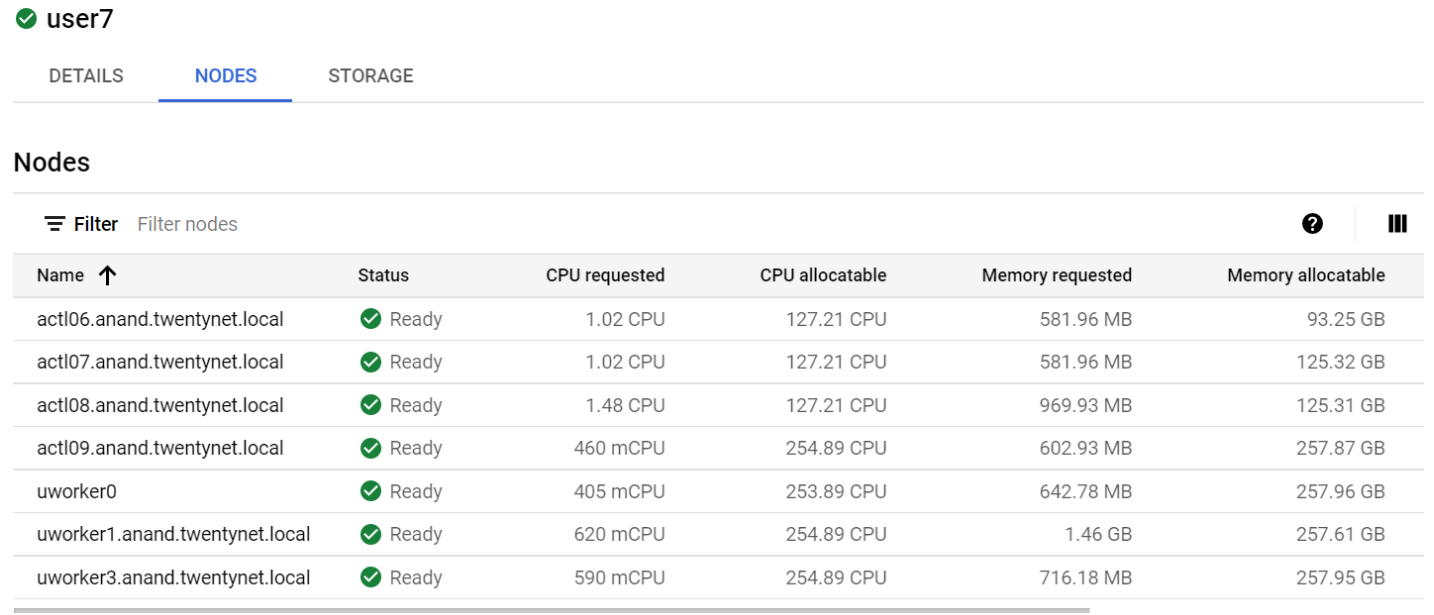
- Once logged into the user cluster, click on nodes it will displays as follows.