# Deploying operating system on bare-metal nodes
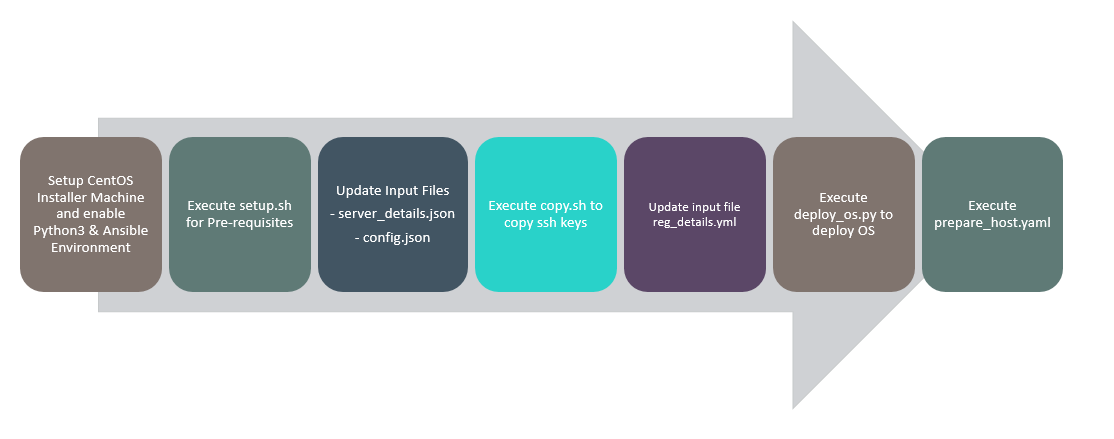
Pre-requisites
Centos 7 or RHEL Installer machine with the following configurations is essential to initiate the OS deployment process.
At least 200 GB disk space (especially in the "/" partition), 4 CPU cores and 8GB RAM.
1 network interface with static IP address configured on same network as the management plane of the bare-metal servers and has access to internet.
Python 3.6 or above is present and latest version associated pip is present.
Ansible 2.9 should be installed
OS ISO image is present in the HTTP file path within the installer machine.
Ensure that SELinux status is disabled.
# Anthos hosts
2 network interfaces for the production network
1 local drive to be used as the boot device
Boot mode is set to UEFI
Boot order - Hard disk
Secure Boot - disabled
# Installation
Enable Python3 and Ansible Environment as mentioned in "Installer machine" section of deployment guide.
Setup the installer machine.
# sh setup.sh
Enter the installer machine OS. ("rhel7" for RHEL OS and "centos7" for Centos OS)
NOTE
Run the below command to fix any unwanted space, tabs error.
# sed -i \'s/\\r\$//\' \<path\>/setup.sh
- This script contains 1 input file input.json, both of which needs to be updated with values for all the variables present within them.
a. Edit input.json file with the following command and add the details of web server and operating system to be installed.
Default password for Ansible Vault file "config.json" is changeme.
Command to edit config.json
# ansible-vault edit input.json
Example values for the input configuration is as follows
{

"HTTP_server_base_url" : "http://10.0.x.x/",

"HTTP_file_path" : "/usr/share/nginx/html/",

"OS_type" : "srhel8",

"OS_image_name" : "\<os_iso_image_name_with_extension\>"

}

{

"Server_serial_number" : "MXxxxxxDP",

"ILO_Address" : "10.0.x.x",

"ILO_Username" : "username",

"ILO_Password" : "password",

"Hostname" : "hostname01.twentynet.local",

"Bonding_Interface1" : "eth*",

"Bonding_Interface2" : "eth*",

"Host_IP" : "20.x.x.x",

"Host_Username" : "root",

"Host_Password" : "Password",

"Host_Netmask" : "255.x.x.x",

"Host_Gateway" : "20.x.x.x",

"Host_DNS" : "20.x.x.x",

"Host_Search" : "twentynet.local",

"GPU_Host" : "yes"

},

{

"Server_serial_number" : "MXxxxxxDQ",

"ILO_Address" : "10.0.x.x",

"ILO_Username" : "username",

"ILO_Password" : "password",

"Hostname" : "hostname02.twentynet.local",

"Bonding_Interface1" : "eth*",

"Bonding_Interface2" : "eth*",

"Host_IP" : "20.0.x.x",

"Host_Username" : "root",

"Host_Password" : "Password",

"Host_Netmask" : "255.x.x.x",

"Host_Gateway" : "20.x.x.x",

"Host_DNS" : "20.x.x.x",

"Host_Search" : "twentynet.local",

"GPU_Host": "No"

}
NOTE
Acceptable values for "OS_type" variable is "rhel8", "centos8", "ubuntu18", and "ubuntu20
Default password for Ansible Vault files "server_details.json" is changeme.
NOTE
Acceptable values for "GPU_Host" variable is "yes" for host which has GPU cards and "No" for hosts which do not have GPU cards.
- Executing the script to deploy operating system.
ansible-playbook --i hosts deploy_os.yaml --ask-vault-pass
NOTE
- Generic settings done as part of kickstart file for OS are as follows. It is recommended that the user reviews and modifies the kickstart files to suit their requirements.
Minimal Installation
Language - en_US
Keyboard & layout - US
Partition
/boot/efi ,fstype="vfat" ,size=500MiB
root, size = 150G
srv , size = 100G
swap, size = 62.96G
var, size = 200G
home, size = 25G
Specified Partitions are inline with Anthos implementation and is advised not to make changes to this.
timezone - America/NewYork
NIC teaming is performed with devices as specified in Bonding_Interface field of input_files/server_details.json input file. It is further assigned with the Host_IP, Netmask, Domain as defined in the input_files/server_details.json input file.