Getting started with cmf¤
Common Metadata Framework (CMF) has the following components:
- Metadata Library exposes APIs to track pipeline metadata. It also provides APIs to query the stored metadata.
- CMF Client interacts with the CMF Server to pull or push metadata.
- CMF Server with GUI interacts with remote CMF Clients and merges the metadata transferred by each client. This server also provides a GUI that can render the stored metadata.
- Central Artifact Repositories host the code and data.
Setup a CMF Client¤
CMF Client is a tool that facilitates metadata collaboration between different teams and team members. These clients
interact with the CMF Server to push/pull metadata.
Pre-Requisites
- Python 3.9+
- Git latest version
Install cmf library i.e. cmflib
pip install https://github.com/HewlettPackard/cmf
pip install cmflib
Install CMF Server¤
CMF Server is the primary interface for the user to explore and track their ML training runs by browsing the stored metadata. Users can retrieve the saved metadata file and can view the content of the saved metadata file using the UI provided by the CMF Server.
Details on how to set up a CMF Server can be found here.
Simple Example of using the CMF Client¤
In this example, CMF is used to track the metadata for a pipeline named Test-env which interacts with a local artifact repository and a CMF Server.
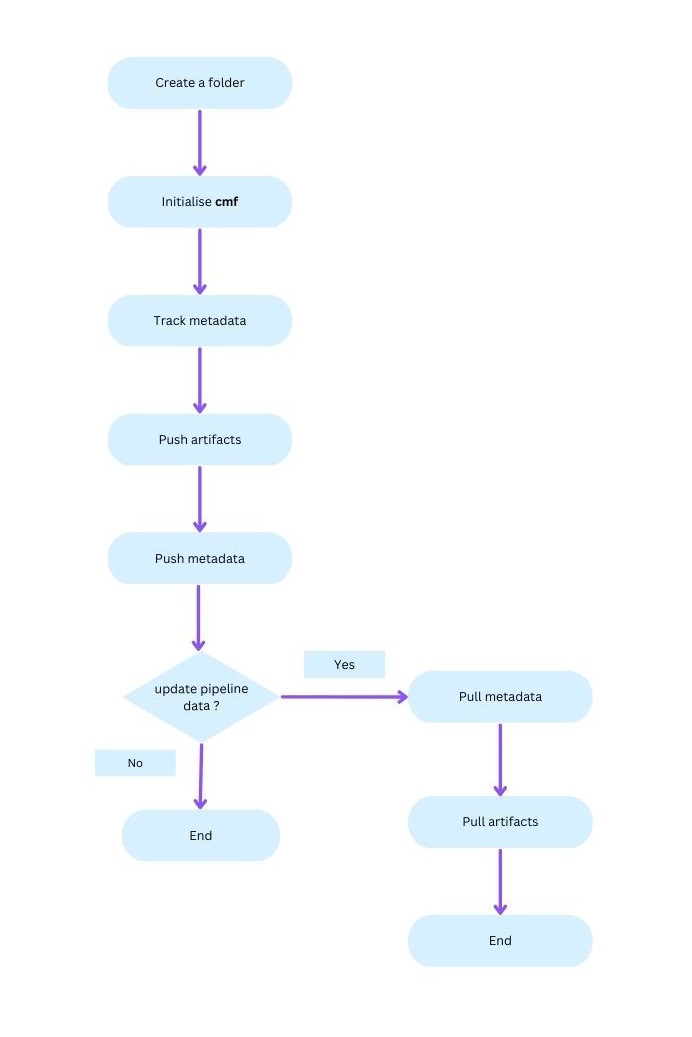
Setup the example directory
mkdir example-folder && cd example-folder
Initialize cmf¤
CMF must be initialized to use CMF Client commands. The following command configures a local artifact repository and specifies the connection to a CMF server.
Basic Usage (Required Parameters Only):
cmf init local --path /path/to/local-storage \
--git-remote-url https://github.com/user/experiment-repo.git
With Optional Parameters:
cmf init local --path /path/to/local-storage \
--git-remote-url https://github.com/user/experiment-repo.git \
--cmf-server-url http://x.x.x.x:80 \
--neo4j-user neo4j --neo4j-password password \
--neo4j-uri bolt://localhost:7687
Check status of CMF initialization (Optional)
cmf init show
Track metadata using cmflib
Use Sample projects as a reference to create a new project to track metadata for ML pipelines.
More info is available here.
Push artifacts
Push artifacts in the artifact repository initialized in the Initialize cmf step.
cmf artifact push
Push metadata to CMF Server
cmf metadata push -p 'Test-env'
CMF Client with collaborative development¤
In the case of collaborative development, in addition to the above commands, users can follow the commands below to pull metadata and artifacts from a common CMF Server and a central artifact repository.
Pull metadata from the server
Execute cmf metadata command in the example_folder.
cmf metadata pull -p 'Test-env'
Pull artifacts from the central artifact repository
Execute cmf artifact command in the example_folder.
cmf artifact pull -p "Test-env"
Flow Chart for cmf¤